As an Amazon Associate, we earn from qualifying purchases.

Panasonic . AJ-RC10G

Gallery
Attributes

Brand name, Manufacturer name, Manufacturer, BrandPanasonic
WeightUnitlbs
moq, multiple, PackageQuantity1
MPN, ModelNumber, Model_number, PartNumber, Part_numberAJ-RC10G
qtyInStock0
SKUPAAJRC10
AdultProduct, Autographed, Batteries_included, Memorabilia, TradeInEligibleFalse
AsinB0081684WQ
ClassificationId10967581
Connectivity_technologyInfrared
DisplayNameRemote Controls
Height, Width200 75
Identifier0791871304297 791871304297
IdentifierTypeEAN UPC
ItemClassificationBASE_PRODUCT
ItemName, Item_namePanasonic AJ-RC10 Remote Control
Item_type_keywordaudio-video-remote-controls
KeywordAGEC4GPJ
Linkhttps://m.media-amazon.com/images/I/31zOm4QmmDL._SL75_.jpg https://m.media-amazon.com/images/I/31zOm4QmmDL.jpg
Maximum_range10.0
Model_year2012
ProductTypeREMOTE_CONTROL
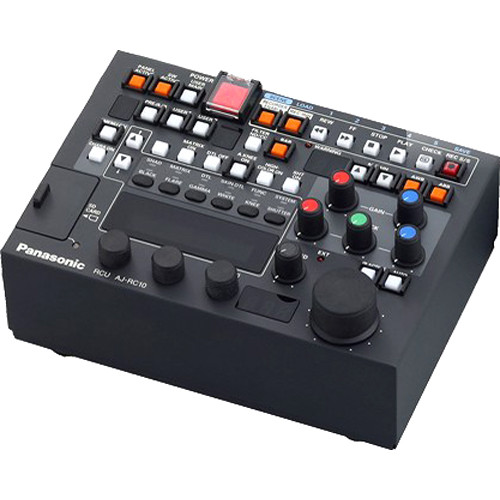
Product_descriptionThe AJ-RC10 is an advanced remote control unit designed for use with Panasonic's 300Studio and P2Studio camcorder studio systems. An upgrade to the AG-EC4GPJ Extension Control Unit, the AJ-RC10 offers enhanced controls of each system's base station, along with an extended range of up to 90 meters (295 feet) with optional cables. With its "one button per function" capability, the unit lets you see exactly which menus you're using without needing to access the camera's menu system. It also includes an SD card slot for saving scene files, as well as a Monitor Out for viewing. The AJ-RC10 is compatible with the AJ-HPX3700, AJ-HPX2700, AJ-HPX3000, AJ-HPX200, AND AG-HPX500 P2 camcorders, as well as the DVCPRO AJ-HDX900. It comes standard with a 10-pin, 10 meter (32 foot) remote control cable. Control Functions Include: gain up/down output camera/bar selection (linked to auto knee) white balance A/B/Preset selection AWB/ABB execution shutter SS/Fix/Off selection and speed setting iris auto/manual selection and adjustment master pedestal painting camera menu settings recorder operation (Rec/Play/FF/Rew/Rec check) scene files Dedicated switches are provided for direct operation of some of the camera unit's frequently used functions. By switching to the recorder mode, the camcorder can be controlled directly through the VTR operation switch. Recording can also be disabled using a switch. Frequently used menus can be set by accessing the menus on the LCD panel of the unit. It is also possible to display the time code on the LCD panel. Downconverted images with characters are output from the VIDEO OUT connector. The menus can be operated on the main unit of the camcorder by connecting the external monitor. Scene file data can be stored on an SD memory card.
Product_site_launch_date2012-05-07T16:18:33.051Z
Typeean upc
Unitmeters
VariantMAIN
WebsiteDisplayGrouphome_theater_display_on_website
WebsiteDisplayGroupNameHome Theater

Distributor offers

SellerSKUMOQIn stockMultiplePrices
bhphotovideo.comPAAJRC1011
AdoramaPCAJRC10G111 @ $4617.90
avalive.com430631Not Available/Discontinued1

Related on Amazon

As an Amazon Associate, we earn from qualifying purchases. (paid link) CERTAIN CONTENT THAT APPEARS ON THIS SITE COMES FROM AMAZON. THIS CONTENT IS PROVIDED 'AS IS' AND IS SUBJECT TO CHANGE OR REMOVAL AT ANY TIME.

Panasonic AJ-RC10 Remote Control
Brand: Panasonic
The AJ-RC10 is an advanced remote control unit designed for use with Panasonic's 300Studio and P2Studio camcorder studio systems. An upgrade to the AG-EC4GPJ Extension Control Unit, the AJ-RC10 offers enhanced controls of each system's base station, along with an extended range of up to 90 meters (295 feet) with optional cables. With its "one button per function" capability, the unit lets you see exactly which menus you're using without needing to access the camera's menu system. It also includes an SD card slot for saving scene files, as well as a Monitor Out for viewing. The AJ-RC10 is compatible with the AJ-HPX3700, AJ-HPX2700, AJ-HPX3000, AJ-HPX200, AND AG-HPX500 P2 camcorders, as well as the DVCPRO AJ-HDX900. It comes standard with a 10-pin, 10 meter (32 foot) remote control cable. Control Functions Include: gain up/down output camera/bar selection (linked to auto knee) white balance A/B/Preset selection AWB/ABB execution shutter SS/Fix/Off selection and speed setting iris auto/manual selection and adjustment master pedestal painting camera menu settings recorder operation (Rec/Play/FF/Rew/Rec check) scene files Dedicated switches are provided for direct operation of some of the camera unit's frequently used functions. By switching to the recorder mode, the camcorder can be controlled directly through the VTR operation switch. Recording can also be disabled using a switch. Frequently used menus can be set by accessing the menus on the LCD panel of the unit. It is also possible to display the time code on the LCD panel. Downconverted images with characters are output from the VIDEO OUT connector. The menus can be operated on the main unit of the camcorder by connecting the external monitor. Scene file data can be stored on an SD memory card.
View on Amazon (paid link)